Understanding Google Reviews: A Comprehensive Guide for Local Businesses
Discover the importance of Google reviews for a local business. Our guide covers how they work, their direct impact on SEO, and how to get more feedback.
Posted by
 Miracle Nnamdi
What Are Google Reviews for a Local Business?
Google Reviews are public feedback and star ratings that customers leave on a business's Google Business Profile. This user-generated content directly influences a local business's online reputation, customer trust, and visibility in Google Search results and on Google Maps. They are a foundational element of your digital presence, acting as powerful social proof for potential customers evaluating your services.
Core Components
A Google Review is composed of several key elements that provide a multi-faceted view of a customer's experience.
- Star Rating System: This is a quick, 1-to-5-star visual summary of the overall customer experience. The aggregate of these ratings creates the average star score displayed prominently on your profile. This visual cue is often the first piece of information a potential customer processes.
- Written Feedback: This is the detailed text comment from a customer, often categorized as User-Generated Content (UGC). It provides context for the star rating, explaining what the customer liked or disliked. This qualitative data is invaluable for both other customers and for Google's algorithm, which uses the text to understand service specifics.
- Photos/Videos: Customers can upload their own photos or videos along with their review. These visuals add a layer of authenticity and context, showing real-world examples like a photo of a completed landscaping project, a new haircut from a salon, or the atmosphere inside a restaurant.
These components combine to form a comprehensive picture of your business from the customer's perspective, hosted directly on your Google Business Profile.
How Google Reviews Work
The process of creating, publishing, and managing Google Reviews involves the customer, the business, and Google's platform, each with a distinct role. Understanding this workflow is essential for effectively managing your online reputation.
The Customer's Process
For a customer, leaving a review is a straightforward process. It begins when they find your business on Google Search or Google Maps. They navigate to your profile, locate the review section, and click a prompt to "Write a review." They are then asked to select a star rating, write about their experience in a text box, and add any photos. Once they click "Post," their feedback is submitted.
The Business's Process
Once a customer submits a review, it is published publicly on your Google Business Profile. As the business owner or manager, you should receive a notification via email or the Google Business Profile app. Your primary action is to post a public reply. Responding to reviews—both positive and negative—is a critical part of the process, demonstrating engagement and customer care. This public dialogue is visible to all future potential customers and shows you are an active, attentive business owner.
Google's Role
Google acts as the platform and moderator. Its algorithm's primary goal is to display reviews it deems most helpful and relevant to searchers, which is why you may see certain reviews highlighted as "most relevant." Google also enforces strict review policies to combat spam, fake content, conflicts of interest, and other prohibited behaviors like review gating (selectively soliciting positive reviews). Businesses must operate within these guidelines to maintain a healthy and credible review profile. Violations can lead to review removal or other profile sanctions.
[Link to: Understanding Google Review Penalties and How to Avoid Them]The Critical Importance of Google Reviews for Small Business Success
For any Small Business or Local Business, Google Reviews are one of the most powerful and cost-effective marketing assets available. They are not merely a feature of your online profile; they are a direct driver of customer acquisition, retention, and brand perception.

Build Trust and Credibility
Google Reviews function as modern-day word-of-mouth marketing. They are trusted testimonials that operate at a massive scale. A strong profile with authentic, positive reviews serves as a critical first impression, immediately establishing a baseline of trust before a potential customer ever contacts you. This social proof is a powerful psychological trigger that validates a customer's decision to consider your business, making them feel more confident in their choice.
Directly Influence Purchasing Decisions
A high star rating and a collection of positive written comments can be the single deciding factor that pushes a customer to choose your business over a competitor. In a crowded local market where services may appear similar, a superior review profile is a significant differentiator. Conversely, a low rating or a series of unaddressed negative reviews can actively drive potential customers away. Reviews remove uncertainty from the buying process, giving customers the confidence to make a call, visit your store, or book an appointment.
Provide Invaluable Customer Feedback
Reviews are a direct, unfiltered line of communication from your customers. They offer honest insights into what your business is doing well and, more importantly, where it can improve. For example, a restaurant owner might notice a pattern of reviews mentioning slow service on Saturday nights, prompting them to adjust staffing levels. This feedback is a free source of market research you can use to refine your offerings, train your staff, and enhance the overall customer experience.
Form the Core of Your Online Reputation Management
Your online reputation is the collection of digital information that shapes public perception of your brand. Google Reviews are arguably the most visible and influential component of this reputation. Proactively managing your reviews is essential for controlling your brand's narrative. This involves more than just collecting positive feedback; it means responding to all reviews in a timely and professional manner. A thoughtful response to a positive review builds loyalty, while a professional response to a negative one can mitigate damage and demonstrate accountability.
[Link to: How to Respond to Positive Google Reviews and Build Strong Customer Relationships][Link to: Dealing with Negative Google Reviews: Strategies for Professional Responses and Reputation Management]
The Local SEO Benefits of Google Reviews
Google Reviews are a confirmed and significant ranking factor for Local SEO. Google's objective is to provide the best and most relevant local results, and customer feedback is a primary indicator of a business's quality and prominence within its community.
Boost Visibility in the Google Local Pack
The quantity, velocity (recentness), and quality of your reviews heavily influence your ranking in the Google Local Pack. This is the block with a map and three business listings that appears at the top of local search results (e.g., for "plumber near me").
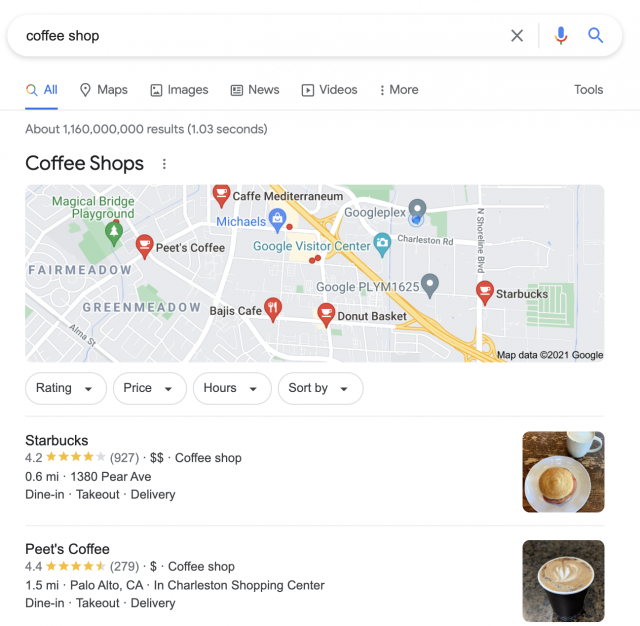
A business with a high volume of recent, 4- and 5-star reviews sends strong signals to Google that it is a prominent and trusted entity. This increased prominence in the Local Pack and on Google Maps searches translates directly to more visibility, more clicks, and more foot traffic.
Increase Click-Through Rates from Search Results
Your aggregate Star Rating appears directly in the search results next to your business name. This rich snippet is a powerful visual magnet. When a user scans a list of local businesses, a listing with a 4.8-star rating from 250 reviews is far more likely to be clicked than a competitor with a 3.5-star rating or no rating at all. A high rating with a substantial number of reviews conveys immediate authority and encourages more users to click on your listing, increasing your click-through rate (CTR) from search.
Enhance Keyword Relevance
The written content of customer reviews provides a rich source of user-generated keywords and semantic context. Customers often use natural language and specific terms related to your services or location, such as "the best emergency plumber in Brooklyn" or "quick and affordable oil change in Austin." This UGC helps Google better understand the full scope of what your business offers. It can improve your relevance for a wider range of long-tail search queries, effectively broadening your SEO footprint without any extra work.
How Do I Get a Google Review for My Business?
You get a Google review for your business by creating and sharing a direct review request link with satisfied customers and making the process of leaving feedback as simple and frictionless as possible. The most successful strategies are proactive, systematic, and focus on asking at the peak of customer satisfaction.
Key Methods for Review Generation
- Directly Ask: The simplest method is to ask happy customers for a review in person. The ideal time is at the end of a successful transaction or service completion. Train front-line staff (e.g., technicians, receptionists, cashiers) to identify happy customers and use a simple script like, "Glad we could help today! If you have a moment, a review on Google would mean a lot to our local business."
- Share Your Link: Create a direct link to your Google review page and share it through digital channels. This removes the friction of the customer having to search for you. A common workflow is to send an automated follow-up email or SMS message a few hours after a service or purchase.
[Link to: Your Step-by-Step Guide to Finding Your Google Review Link (and Sharing It Effectively)]- Use On-Site Prompts: For brick-and-mortar businesses, physical prompts can be very effective. This includes placing QR codes on receipts, business cards, table tents, or stickers on the back of the front door. These prompts lead customers directly to your review page when scanned with a smartphone.
[Link to: Creating a Google Reviews QR Code: The Easiest Way to Collect Feedback On-Site]- Website Integration: Add a prominent "Review Us on Google" button or call-to-action (CTA) on your website. Common placements include the website footer, contact page, or a dedicated testimonials page. This provides a constant, passive opportunity for website visitors to leave feedback.
How Customers Write a Google Review for a Local Business
Customers write a Google review by finding a business's profile on Google Search or Maps, clicking the "Write a review" button, selecting a star rating, and then optionally adding text and photos before posting. Understanding this simple process helps you provide clear, easy-to-follow instructions when requesting feedback.
The Typical Customer Steps Are:
- Search for the business name on Google or within the Google Maps app. This brings up the business's Google Business Profile.
- Navigate to the reviews section. The customer clicks the "Reviews" tab or scrolls down to find the review summary and a prompt to add their own feedback.
- Click the "Write a review" button. This opens a pop-up window where the customer can compose their review.
- Select a star rating. The first step is to choose a rating from 1 to 5 stars, representing their overall satisfaction.
- (Optional) Write about their experience. A text box is provided for the customer to add details and specific comments about the service or product.
- (Optional) Add relevant photos. An option to upload photos allows customers to add visual evidence to support their review.
- Click "Post." After completing the desired fields, the customer clicks the post button to submit their review, which then typically appears on the business profile almost instantly.
By knowing these steps, you can create simple guides for your customers, making the process feel less intimidating and increasing the likelihood they will follow through.
[Link to: Writing a Google Review: Tips for Customers and How Businesses Can Guide Them]Hypothetical Example: How "The Corner Cafe" Used Reviews to Become a Local Favorite
This hypothetical example illustrates the transformative power of a focused review strategy on a typical local business.
- The Problem: The Corner Cafe was a small, independent coffee shop with excellent products. However, their online presence was nearly nonexistent. With only 3 reviews and a 3.7-star rating, they struggled to attract new customers browsing online and were consistently losing business to a nearby national coffee chain.
- The Strategy: The owner decided to take control of their digital reputation. First, they fully optimized their Google Business Profile with updated hours, high-quality photos, and detailed service descriptions.
Next, they began a simple but consistent review generation campaign. They printed small cards with a QR code linking directly to their Google review page and placed them at the checkout counter. Baristas were trained to personally ask regular, happy customers if they would share their feedback. Critically, the owner committed to replying to every single new review within 24 hours.[Link to: How to Claim and Optimize Your Google Business Profile for Maximum Review Visibility] - The Result: The impact was dramatic. Within three months, The Corner Cafe grew from 3 reviews to over 75, with their average rating climbing to a stellar 4.8 stars. This surge in positive signals caused them to begin ranking in the Google Local Pack for high-value search terms like "cafe near me" and "best coffee in [City Name]." The owner estimated that daily foot traffic increased by approximately 30%, a growth they attributed directly to their improved online visibility and reputation.
Comparing the Impact of Star Ratings on a Local Business
The aggregate star rating is more than just a number; it is a powerful signal that directly correlates with key business outcomes. The difference between a poor, average, and excellent rating profile is stark.
| Feature | 1-2 Star Rating (Poor) | 3 Star Rating (Average) | 4-5 Star Rating (Excellent) |
|---|---|---|---|
| Customer Trust | Low / Damaged | Neutral / Hesitant | High / Established |
| Local Pack Visibility | Significantly Reduced | Moderate | Significantly Increased |
| Click-Through Rate | Low | Average | High |
| New Customer Leads | Actively repels potential customers | Inconsistent | Attracts a steady stream |
| Competitive Advantage | Major Disadvantage | Vulnerable | Strong Differentiator |
Frequently Asked Questions (FAQ)
Can I offer discounts or gifts for Google Reviews?
No. Offering incentives like discounts, coupons, or free gifts in exchange for reviews is a direct violation of Google's Review Policies. This practice compromises the integrity of the review ecosystem. If discovered, it can lead to the removal of the reviews and potential penalties being applied to your Google Business Profile. Focus on earning genuine reviews through excellent service.
How many Google Reviews do I need to be successful?
There is no magic number. The goal is to maintain a consistent stream of new reviews (which signals to Google that you're active and relevant) and to have a stronger profile than your direct local competitors. A good starting point is to analyze the top three competitors in your local pack and aim to surpass their review count and average rating.
Do my responses to reviews matter for SEO?
While a business's response is not a direct ranking factor in the same way a review itself is, it has significant indirect benefits. Google has stated that responding to reviews shows you value your customers. This engagement builds public trust and can increase conversions. These positive user signals can indirectly support your overall Local SEO efforts.
What's the difference between Google Reviews and website testimonials?
The key differences are platform, control, and trust. Google Reviews are hosted on Google's third-party platform, which gives them a high degree of perceived objectivity and carries significant weight as a local search ranking factor. Website testimonials are hosted on your own site, giving you full control over which ones to display. However, they are perceived as less impartial by savvy consumers and have no direct impact on your Google search rankings.
How long does it take for a new Google review to show up?
In most cases, a new Google review appears on your business profile almost instantly. However, some reviews may be temporarily delayed if Google's automated spam filters flag them for a manual check to ensure they comply with platform policies. This verification process can take anywhere from a few hours to several days.
The Bottom Line: Make Google Reviews Your Local Business Superpower
Google Reviews have evolved from a passive, "nice-to-have" feature into an essential component of any modern local marketing strategy. They are a direct and measurable driver of customer trust, online visibility, and, ultimately, revenue. For a local business, they level the playing field, allowing excellent service to translate directly into a powerful competitive advantage.
By understanding how reviews work, recognizing their importance, and implementing a consistent strategy for generating and managing them, any local business can transform customer feedback into its most potent engine for growth. The work you do to earn a 5-star rating is a vital first step, but ensuring potential customers see that hard-earned reputation is the crucial next one.
Once you've built a strong base of positive Google Reviews, the logical next step is to leverage that social proof directly on your own website. Displaying your best reviews builds immediate trust with visitors and can dramatically increase conversion rates.
Tools like Embed Review are designed for this exact purpose, providing a simple, no-code widget that automatically showcases your latest Google Reviews on your site. With a setup that takes just 60 seconds, it keeps your website's social proof fresh and authentic, turning your happy customers into your most effective sales team.
Next Step: Explore embed-review.com
If this guide was useful, visit embed-review.com to learn how their product can help:
- What embed-review.com offers: Embed Review provides an embeddable widget for businesses to showcase their Google Reviews on their website. The service offers a simple, 60-second setup with no coding required, automatically updating reviews to help businesses build trust and increase conversions.
- Website: https://www.embed-review.com
